
Ericsson Baseband 6630 / 6620 Board Restore by Software or Hardware
Cara Board Restore atau Reset Baseband 6630 / 6620 Ericsson ke Factory lewat software atau Hardware
01. Connect the computer to LMT port on the unit by Straight ethernet cable | Hubungkan port RJ45 laptop/desktop dengan port LMT di Baseband dengan kabel LAN Straight
02. Configure the computer ip address/subnet mask on "Local Area Connection" ( see here ) | Setel ip address dan subnet mask laptop/desktop di pengaturan ethernet ( cek disini )
03. Start a web browser. Disable any proxies in the web browser. Go to Emergency Access GUI: https://169.254.2.2/ea.html and click Board restore button. | Buka browser, matikan semua proxy dan masuk ke alamat https://169.254.2.2/ea.html. Cari dan klik tombol "Board Restore".
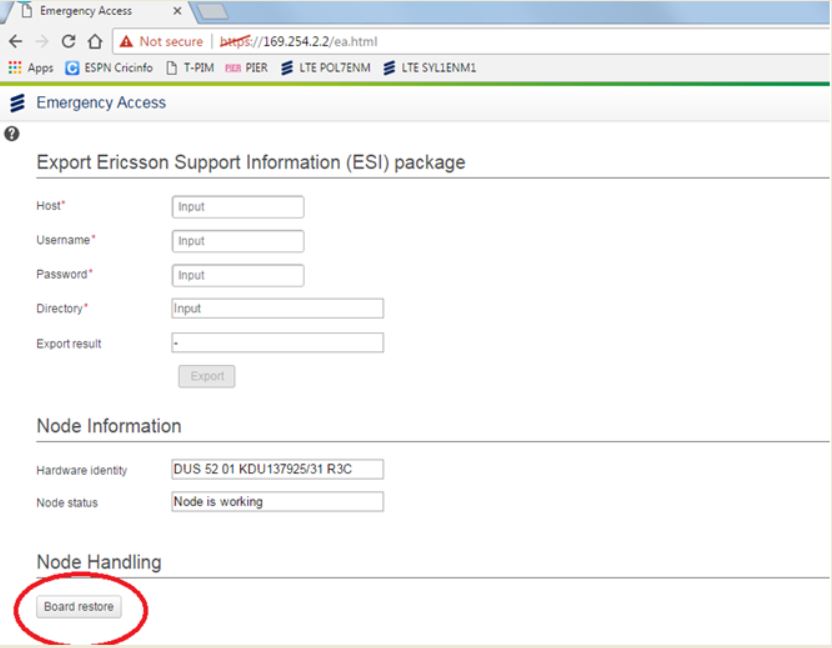
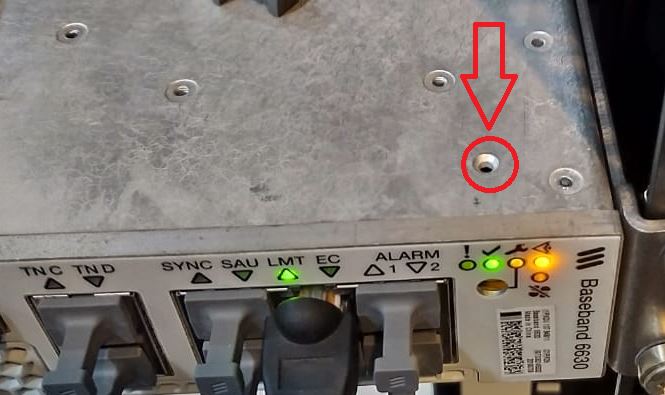
If "Board Restore" button is not available, please do it by pressing Board Restore button on the unit | Jika tombol "Board Restore" tidak ada, lakukan Board Restore dengan menekan tombol board restore pada unit
go to home | back | go to top
Vila Mas Indah Blok C6 No.4, Kelurahan Perwira, Kecamatan Bekasi Utara. Kota Bekasi 17122
wa : 081382552971
ig : ari_surreni fb : wahyudin.shop
